
FlutterからWiFiアクセスポイントに接続する方法
Flutterのwifi_iotパッケージを使ってWi-Fiアクセスポイントに接続した記録。
過去の記事(Qiitaから移行)
この記事は公開当時の知識・環境に基づいて書いたものです。現在の仕様に合わせた更新・動作確認は行っておらず、内容の正確性や動作を保証するものではありません。
前提条件(iOSの場合)
https://help.apple.com/developer-account/#/dev21218dfd6
Hotspot Configurationという機能を利用しますが、上記リンクに記載されている通り、ADP又はEnterpriseを利用します。そのためAppleに毎年約1万円という学生の方(私)にとってとても痛い契約をしていない方は利用できませんのでご注意ください。
検証環境
[✓] Flutter (Channel stable, 3.0.1, on macOS 12.4 21F79 darwin-arm, locale ja-JP)
[✓] Android toolchain - develop for Android devices (Android SDK version 30.0.3)
[✓] Xcode - develop for iOS and macOS (Xcode 13.4)
[✓] Chrome - develop for the web
[✓] Android Studio (version 2021.1)
[✓] IntelliJ IDEA Ultimate Edition (version 2022.1)
[✓] IntelliJ IDEA Ultimate Edition (version 2022.1)
[✓] VS Code (version 1.67.2)
[✓] HTTP Host Availability
利用パッケージ
次のパッケージを利用します。(随筆時点はv0.3.16)
https://pub.dev/packages/wifi_iot
iOSの場合
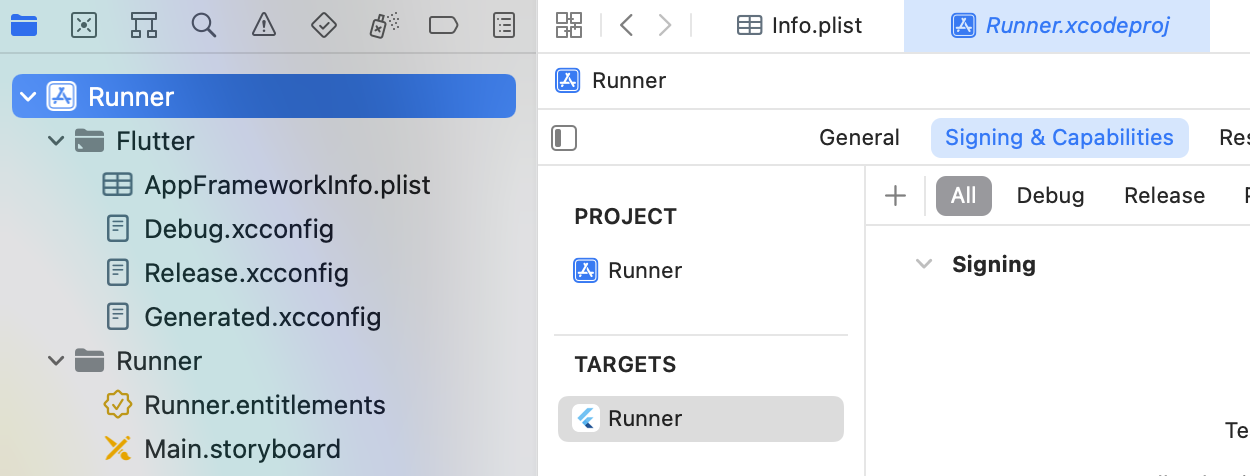 XCodeでプロジェクトを開き、
Runner > Signing & Capabilities > Allの隣の+
を選択し、HotSpot Configurationを選択して有効にします。
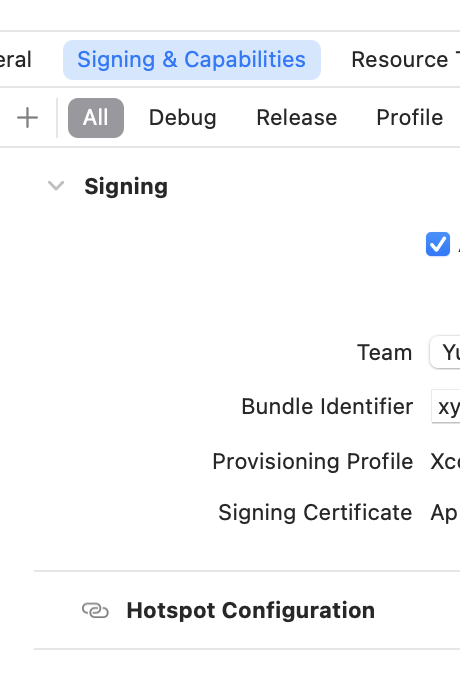
コード
WiFiForIoTPlugin.connect(/*SSID*/,
    password: /*password*/,
    security: /*NetworkSecurity型のセキュリティ*/,
    joinOnce: /*1度きりの接続かどうか*/);
詳しいドキュメントはこちらからどうぞ。 https://pub.dev/documentation/wifi_iot/latest/wifi_iot/WiFiForIoTPlugin-class.html